
Case Study:
Mt. Everest

Case Study:
Marine Exploration

Case Study/Video:
Red Bull Racing

Case Study:
Tablet PC at Beer Wholesaler

Tablet PC
Torture Chamber

|

|

|
|
MobileDemand xTablet T8655
Compact rugged 8-inch Windows tablet with Intel Alder Lake-N (N100), improved performance, brighter display, and field-ready durability
by Conrad H. Blickenstorfer
The MobileDemand xTablet T8655 is one of the few rugged 8-inch Windows tablets currently available, designed for warehouse, manufacturing, field service, and industrial data-capture work.
The xTablet T8655 is a rugged 8-inch tablet computer introduced in October 2025 by MobileDemand, one of the pioneers in purpose-built mobile computing solutions for frontline work in warehouses, distribution centers, manufacturing, and field service. The MobileDemand xTablet T8655 represents the latest generation of the long-running xTablet T8650 platform — a product line with a history spanning more than a decade.
It is worth noting up front that the outgoing T8650 offered something genuinely unique: an optional integrated Intel RealSense 3D camera system. This allowed automatic measurement of length and volume, and even enabled the creation of photorealistic 3D models, effectively positioning the device at the forefront of what was then an emerging field of dimensional data acquisition. We covered this capability in detail in our full T8650 review (see here).
In practice, however, the technology never achieved widespread adoption and ultimately fell short of MobileDemand's expectations. Intel's subsequent exit from the RealSense camera business brought that chapter to a close. That is unfortunate, as the concept — and its potential — remain compelling.
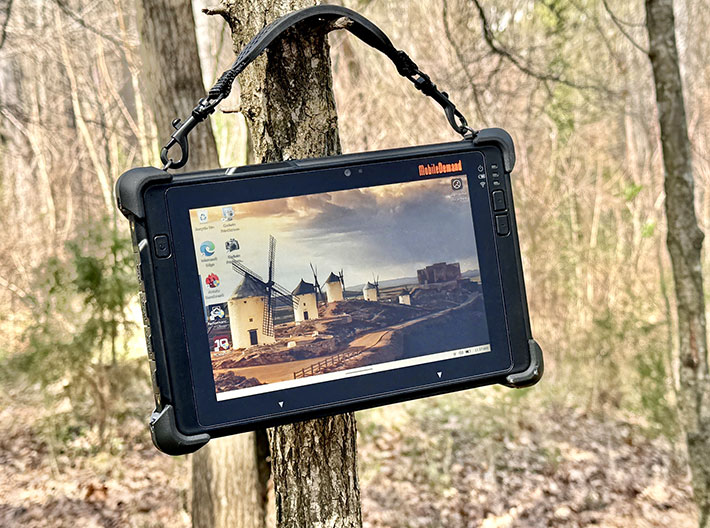
That, however, was then. And it is important to keep in mind that the 3D camera option never defined the T8650. It remained, first and foremost, a compact, tough, and versatile 8-inch Windows tablet, with the RealSense system available as an optional, specialized capability.
With the T8655, MobileDemand delivers a comprehensive refresh of that platform, incorporating current-generation technology and, according to the company, up to three times the overall performance. That kind of uplift has the potential to significantly improve application responsiveness as well as the speed and efficiency of data capture in day-to-day operations.
So what does this new generation bring? The T8655 remains a compact and highly portable 8-inch device, but with thoroughly updated internals, solid connectivity, a wide range of data acquisition options, and the level of ruggedness expected in this class. Where the earlier T8650 occupied the upper end of MobileDemand's small-form-factor lineup — alongside models such as the T1500 and Flex 8 — the T8655 now stands as the company's sole offering in the 8-inch category.
Despite its modernized platform, the T8655 is still positioned below the Intel Core and Core Ultra processor tier, helping to keep pricing accessible while delivering sufficient performance for its intended workloads.
The image below provides a quick visual comparison with other MobileDemand tablets: the compact xTablet T8655 on the left, the 10.1-inch xTablet T1175 in the center, and the high-end 11.6-inch xTablet T1690 on the right.

Seen side by side, each size class serves a distinct role, but it is immediately apparent how much more compact the T8655 is compared to its larger siblings.
Why an 8-inch rugged Windows tablet still matters
There are not many rugged 8-inch tablets on the market today, and one reason may be the steady growth of smartphone display sizes, which now approach 7 inches. As a result, the once-popular 7-inch tablet form factor has largely disappeared.

This raises an obvious question: what is the role of an 8-inch tablet today, and in particular one running Microsoft Windows?
While Microsoft exited the smartphone and handheld market years ago, Windows remains widely used on tablets, especially in larger screen sizes. That is not surprising. Windows originated as a desktop operating system, and despite significant adaptation over the years, its strengths are still most evident on larger displays. It continues to dominate in traditional desktop environments, but it is less naturally suited to very small screens and touch-centric use.
So where does that leave compact 8-inch Windows tablets?
First, diagonal screen size alone does not tell the full story. Aspect ratio plays a major role in determining usable display area. A modern smartphone with a 21:9 aspect ratio, even with a nearly 7-inch diagonal, is fundamentally different from an 8-inch tablet with a 16:10 aspect ratio, such as the T8655. The difference in usable screen real estate is substantial — on the order of roughly 60 percent more area.
The image at right illustrates this clearly, comparing the xTablet T8655 to an iPhone 16 Pro Max, which features a 6.9-inch display. Despite the similar diagonal measurements, the tablet offers significantly more usable space for applications and data.
|
|
MobileDemand Model
|
xTablet T8655
|
xTablet T8650
|
xTablet T8500
|
|
|
Introduced
|
10/2025
|
06/2016
|
12/2015
|
|
|
Display (inches/resolution)
|
8.0/1920 x 1200
|
8.0/1280 x 800
|
8.0/1280 x 800
|
|
|
Display luminance (nits)
|
650
|
370
|
320
|
|
|
Size (inches)
|
9.2 x 5.9 x 0.87
|
9.2 x 5.9 x 0.87
|
9.0 x 5.8 x 0.65
|
|
|
Weight
|
2.65 lbs
|
1.87 lbs
|
1.53 lbs
|
|
|
Processor Type
|
Intel Processor N100
|
Intel Atom X5-Z8550
|
Intel Atom Z3735F
|
|
|
Processor Codename
|
"Alder Lake-N"
|
"Cherry Trail"
|
"Bay Trail"
|
|
|
Max CPU Speed (base/burst)
|
3.40GHz
|
2.40GHz
|
1.83GHz
|
|
|
Cores/threads
|
4/4
|
4/4
|
4/4
|
|
|
RAM
|
16GB LPDDR5
|
4GB LPDDR3
|
2GB DDR3L-RS 1333
|
|
|
Storage
|
up to 1TB PCIe
|
64GB eMMC
|
64GB
|
|
|
Sealing
|
IP65
|
IP65
|
IP67
|
|
|
Operating temp.
|
14° to 122°F
|
14° to 122°F
|
-4° to 140°F
|
|
|
Drop
|
60 inches
|
60 inches
|
48 inches
|
|
|
Scanner
|
Yes (opt.)
|
Yes (opt.)
|
Yes (opt.)
|
|
|
GPS
|
Yes
|
Yes
|
Yes
|
|
|
Battery
|
64.0 whr ("up to 12 hours")
|
25.0 whr ("up to 9 hours")
|
30.7 whr ("8 hours")
|
The T8xxx platform was originally introduced more than a decade ago, created for customers seeking something more capable than the basic xTablet Flex 8. The Flex 8, essentially a "white-box" generic tablet integrated into a MobileDemand-designed rugged housing, served well as an entry-level solution but had clear limitations.
Positioned above it, the xTablet T8500 offered a more purpose-built approach. While still relatively affordable by rugged tablet standards, it delivered significantly greater durability, including IP67 sealing, a much wider operating temperature range, and a true integrated barcode scanner rather than reliance on camera-based scanning. It also included GPS and a substantially larger battery capable of supporting full-shift operation.
The xTablet T8650 followed shortly thereafter (alongside the slightly updated T8540). Whereas the Flex 8 and T8500 relied on Intel's low-end "Bay Trail" processors, the T8650 moved to the more capable "Cherry Trail" platform, representing a meaningful performance step forward. Otherwise, the specifications were not dramatically different, and at the time we questioned whether the T8650's primary appeal might be its optional RealSense 3D camera system.
As it turned out, the T8650 did not need that feature to succeed. With a product life cycle spanning roughly a decade, it proved to be a well-conceived and highly effective design in its own right.
The new xTablet T8655 builds on that foundation. While it retains the general dimensions of its predecessor, it is noticeably heavier — likely due in large part to its much higher-capacity battery (64 watt-hours versus 25 watt-hours in the T8650). Despite the similar outward appearance, this is a substantially more advanced device, with a significantly more powerful processor, faster storage, higher maximum storage capacity, modern connectivity including reversible USB-C ports, and a higher-resolution, much brighter display.
Although the Intel RealSense 3D camera option is no longer available, the T8655 continues to offer a broad range of integrated and optional data capture technologies. These include a MagTek magnetic stripe reader, a Honeywell N6803 2D imager, NFC, mobile broadband, as well as an extensive ecosystem of docks, mounting solutions, battery chargers, and related accessories.

Compact and handy, but very well protected
In today's world of larger tablets, it is striking just how compact and handy the new xTablet T8655 feels. It is, of course, still much larger than even the biggest of today's plus-size smartphones, but compared to rugged tablets of the past, it is remarkably compact. Even in this new, somewhat heavier version, it avoids the weighty heft that once characterized most rugged tablet computers.
Part of that pleasantly manageable footprint is due to the display's 16:10 aspect ratio. We have long felt that the 16:9 format used by many small tablets makes them appear unnecessarily narrow. While the difference may seem minor on paper, it has a noticeable impact in practice. The proportions of the xTablet T8655 simply look right. Within the inherent constraints of Windows, the display is large enough for real work while remaining comfortable to use in a compact form factor. This is clearly a small tablet, not a hybrid "in-between" device. The era of so-called "phablets" is effectively over, and for good reason.
As has always been the case with MobileDemand products, the xTablet T8655 immediately communicates its rugged purpose. Despite its relatively small size, there is no mistaking it for anything but a work-ready device. Prominent protective bumpers — still among the most effective means of real-world impact protection — frame the unit. The design remains largely black with an industrial finish, visible fasteners, and a purposeful, utilitarian aesthetic. All ports are sealed with flush-fitting protective covers, there are no exposed vents, and multiple loops and attachment points support carrying and mounting.

Unlike MobileDemand's Flex 10 and Flex 12 models, which pair consumer tablets with custom rugged enclosures, the xTablet T8655 — like its predecessor — is engineered as a rugged device from the ground up. It does not attempt to mimic the look or feel of a consumer or business tablet. This is a tool designed for front-line work. Thickness remains at 0.87 inches, unchanged from the earlier model.
At the same time, the capacitive multi-touch display lends the device a modern tablet appearance. The front glass extends well beyond the active LCD area, facilitating smooth touch and multi-touch interaction. A tough rubberized overmold surrounds the perimeter, with only a slight raised lip above the glass to provide additional protection. The corner bumpers, which appear as distinct components, are now screw-mounted and replaceable — an improvement over the previous design.
The bezel leaves room for the orange MobileDemand logo against a black background, adding a subtle touch of visual identity to an otherwise purely functional design.
Below is a view of the xTablet T8655 from the front and all four sides with its protective covers closed. The overall design is straightforward and purposeful, while the pronounced bumpers seen in the side view underscore that this is a well-protected tool built for demanding environments.

The three physical buttons — power, volume up, and volume down — have been repositioned from the top edge of the earlier T8650 to the left and right sides of the display. They continue to provide clear tactile click feedback. The window for the fully integrated industrial-grade 1D/2D barcode scanner is located on the top edge of the tablet. There are also three threaded mounting points for accessories.
Along the bottom is the tablet's surface-mount docking connector, flanked by two alignment holes used for secure placement in docking solutions. In addition, there are four threaded holes for attaching optional hardware and accessories.
The close-ups below show the left side of the tablet with the protective covers removed, revealing the xTablet T8655's ports and I/O. There is no longer a dedicated power jack; charging is handled via one of the two USB 3.2 Gen 2 Type-C ports. The micro-HDMI port found on the predecessor has also been eliminated, with video output now supported through USB-C. Also present is an RJ45 LAN port.
The programmable F1 function key, previously located on the side of the T8650, has been moved to the back of the unit, where it naturally falls under the right index finger. A second programmable button, F2, is positioned on the opposite side of the back, equally easy to reach with the other index finger.

Below is a closer look at the right side of the T8655. From left to right, there is a standard 3.5mm audio jack (still useful in many field scenarios), a Kensington-style lock slot for basic physical security, and a microSD card slot for storage expansion.

The xTablet T8655 remains fanless despite its significantly more powerful electronics. It is also worth noting that, despite the tablet's compact size, the bezels to the left and right of the display are wide enough to comfortably rest the thumb and palm without interfering with operation. This helps prevent inadvertent touch input, a common issue with consumer devices that use edge-to-edge displays.

A look inside: the real thing
Unlike the Flex 10 and 12 models, which pair generic "white-box" tablets with rugged protective enclosures, the xTablet T8655 is a purpose-built rugged device designed from the ground up for durability, functionality, and serviceability. That approach includes a large, removable battery with card slots safely located inside the battery compartment, external access doors for expansion and optional modules, and a fully integrated design executed with careful attention to detail.
As with its predecessor, we fully disassembled the T8655. Examining internal construction is always worthwhile — true ruggedness begins on the inside. Opening the unit requires removing a couple of dozen Phillips screws. The structured ABS plastic rear cover then separates from the deeper, box-like front housing, both sharing the same footprint. Sealing between the two halves is achieved via a continuous groove and a thin, replaceable rubber gasket running around the perimeter — a clean and effective solution.
Below is a view of the rear of the xTablet T8655: on the left fully assembled, and on the right with the corner bumpers, battery, and expansion access cover removed.

Once opened, the xTablet T8655 reveals a meticulously designed internal chassis typical of modern rugged tablets. The structure is dense and intricate, forming a rigid foundation for the display on the front and the battery, circuitry, and modules on the rear. While externally similar to its predecessor, the internal design represents a significant evolution. There are fewer ribbon cables, components are more compact, and overall integration appears more refined. It is not immediately clear whether a separate magnesium frame is still used or if advances in materials and manufacturing have made that unnecessary.

The motherboard itself is relatively large, measuring approximately 8.5 by 5.0 inches, though much of its surface is covered. Areas requiring sealing are protected with white silicone compound. This is an IP65-sealed device, meaning that ingress protection relies in part on external port covers rather than redundant internal sealing. As such, it is important to ensure that all protective covers are firmly closed when operating in wet conditions. One particularly noteworthy detail: there are no loose wires or ribbon cables connecting the housing halves.

The thermal image above, captured with one of our infrared cameras, provides insight into the tablet's heat management. As a fanless design, the T8655 depends entirely on passive thermal dissipation. Under the sustained load of the PCMark 10 benchmark suite, surface temperatures reached approximately 107°F in our lab. In normal operation, however, the device warmed up but never to an uncomfortable degree.
Most I/O is edge-mounted directly on the motherboard, making it fixed rather than modular. Larger rugged tablets often use daughterboards for certain I/O components, allowing more configuration flexibility, but that is not the case here.
 The image on the left shows the optional integrated Honeywell N6803MR FlexRange 2D scan engine (see here). The FlexRange family includes near-, mid-, and far-range variants. Our review unit did not include the scanner, and it is unclear which versions MobileDemand offers. The standard mid-range model is entirely solid-state and uses Honeywell's Smart Adaptus 8.0 technology, capable of decoding even out-of-focus images. It employs a laser dot aimer that remains visible under a wide range of lighting conditions. Despite its capabilities, the module is extremely compact at just 0.93 x 0.64 x 0.27 inches, allowing full integration without the protruding "scanner bulge" seen in older designs.

As is common even in rugged devices, the protective rubber port covers are the primary barrier against liquid ingress. While this is standard practice, it does place responsibility on the user to ensure that all covers are properly seated before exposure to moisture. On the positive side, the covers are part of a single replaceable rubber assembly that is screwed into place and can be easily serviced.
After fully disassembling the unit, we can conclude that the internal design and build quality of the xTablet T8655 are impressive, representing a clear step up from MobileDemand's simpler, value-oriented Flex series.
Intel Alder Lake-N (N100) performance and benchmarks
Intel's processor naming has become increasingly complex, and the "Intel Processor N100" used in the xTablet T8655 (as well as in the xTablet Flex 10C) is a good example. The N100 belongs to a family of processors originally code-named Alder Lake-N, which suggests a close relationship to Intel's 12th-generation Alder Lake Core processors that introduced the hybrid architecture combining performance ("P") cores and efficiency ("E") cores.
 In practice, however, Alder Lake-N is a distinct implementation. It uses only efficiency cores, without the hybrid P-core/E-core combination found in Core processors. In Intel's nomenclature, the "N" series denotes very low-power mobile processors, and the N100 fits that role well, with a thermal design power of just 6 watts — only a fraction of what even low-end Core processors typically require.
 That said, the underlying architecture is far more advanced than the "Atom" label many still associate with Intel's earlier low-power designs. The N100's four efficiency cores are based on Intel's latest E-core microarchitecture. While they lack Hyper-Threading and the high-performance cores of the Core lineup, they are substantially more capable than previous Atom-derived processors. They deliver consistent, sustained performance without heavy reliance on short turbo bursts, and they do so while generating very little heat.
The bottom line is that the N100 is not a hybrid Alder Lake processor, but rather a streamlined design built entirely around modern efficiency cores. It offers reliable and predictable performance for the types of warehousing, retail, field service, and general business applications the xTablet T8655 is designed to handle. Calling it "entry-level" does not fully capture its role; this is a highly efficient, modern processor intended to run real-world workloads continuously.
To put the xTablet T8655's performance into perspective relative to earlier models, the table below shows results from several benchmarks we have used in our lab for many years, including PassMark Software's PerformanceTest 6.1 and 9.0, UL's PCMark 10 benchmark suite (see here), Geekbench, and CrystalMark. For additional context, we included MobileDemand's xTablet Flex 10C, comparable 8-inch rugged tablets from Durabook and RuggON, and the 7-inch Mesa 4 from Juniper Systems.
Benchmark results and performance comparisons
|
MobileDemand xTablet T8655 Benchmarks and Comparisons
|
|
PERFORMANCE COMPARISON
|
MobileDemand
|
MobileDemand
|
Durabook
|
Juniper Systems
|
RuggON
|
|
Model
|
xTablet T8655
|
xTablet Flex 10C
|
R8
|
Mesa 4
|
LUNA 3
|
|
Year tested
|
2026
|
2026
|
2022
|
2024
|
2022
|
|
Processor Type
|
Intel Processor
|
Intel Processor
|
Intel Core
|
Intel Processor
|
Intel Core
|
|
Processor Type: Intel
|
N100
|
N100
|
i5-1230U
|
N200
|
i5-1145G7
|
|
Code name
|
Alder Lake-N
|
Alder Lake-N
|
Alder Lake
|
Alder Lake-N
|
Tiger Lake
|
|
CPU Clock
|
NA/3.40GHz
|
NA/3.40GHz
|
NA/4.40GHz
|
NA/3.70GHz
|
NA/4.10GHz
|
|
CPU Cores/Threads
|
4/4
|
4/4
|
6/8
|
4/4
|
4/4
|
|
Display size
|
8.0 inch
|
10.1 inch
|
8.0 inch
|
7.0 inch
|
8.0 inch
|
|
PassMark 6 overall
|
2,531 |
2,812 |
6,277 |
3,122 |
3,955 |
|
PCMark 9 overall
|
2,014 |
1,429 |
2,703 |
2,174 |
3,203 |
|
PCMark 10 overall
|
2,355 |
2,176 |
3,341 |
1,912 |
3,680 |
|
-Essentials
|
5,658 |
5,544 |
7,578 |
4,552 |
8,234 |
|
-Productivity
|
3,944 |
4,548 |
5,198 |
2,949 |
5,788 |
|
-Digital Content
|
1,589 |
1,114 |
2,571 |
1,465 |
2,828 |
|
GeekBench single
|
1,055 |
948 |
2,251 |
664 |
1,138 |
|
GeekBench multi
|
1,971 |
1,975 |
3,535 |
1,283 |
3,087 |
|
GeekBench OpenCL
|
2,919 |
1,101 |
7,781 |
2,912 |
5,223 |
|
CrystalMark overall
|
203,100 |
181,550 |
274,377 |
157,347 |
311,006 |
First, an obvious question: does the new T8655 meet MobileDemand's claim of "up to 3x faster overall performance" compared to the xTablet T8650?
Based on our testing, it does. When we benchmarked the T8650 in 2016, it achieved an overall score of 746.5 in PassMark PerformanceTest 6.1. Running the same suite on the new T8655 yielded a score of 2,531 — an increase of approximately 3.4 times.
MobileDemand also cites up to 10x faster storage performance. In our testing, the storage-related score improved from 847 on the T8650 to 4,582 on the T8655, representing a roughly 5.4x gain. That is a substantial improvement, even if it does not quite reach 10x in this particular benchmark. As always, results can vary depending on the specific test methodology used.
Despite the impressive progress Intel has made with its efficiency-core designs, we did not expect the T8655 to approach the performance levels of systems based on Intel Core processors — and it does not. However, the Intel Processor N100, combined with fast memory and storage, delivers performance that is closer to entry-level Core-based systems than one might expect.
In the UL PCMark 10 benchmark suite — which we consider a strong indicator of real-world application performance — the N100-based systems do trail Core-powered devices, but the gap is significantly smaller than in earlier generations. There was a time when Atom-based systems lagged far behind Core platforms; that disparity has narrowed considerably.
Overall, the xTablet T8655 represents a substantial step forward over its Cherry Trail-based predecessor. Performance is not only higher, but also more consistent and predictable. Rather than emphasizing short-lived peak speeds, the N100 platform delivers steady, sustained performance — well aligned with the continuous, task-oriented workloads typical of warehousing, retail, and field service environments.
Much higher resolution and brightness than the predecessor
One of MobileDemand's long-standing strengths has been its willingness to explore new and differentiating technologies. A notable example from years past was the use of the innovative Pixel Qi display in early models such as the T7200. While that technology ultimately proved too specialized for broad adoption, it demonstrated the company's readiness to experiment and push boundaries. At the same time, MobileDemand has consistently maintained strong display quality across its product range, including entry-level models. With the display in the new T8655, the company once again delivers.
An 8-inch screen is near the lower limit of what is practical for Microsoft Windows, making resolution especially important. The T8650's 1280 x 800 pixel display was borderline in that regard, as Windows can be unforgiving at lower resolutions. The move to 1920 x 1200 pixels in the T8655 is therefore a significant and very welcome upgrade.
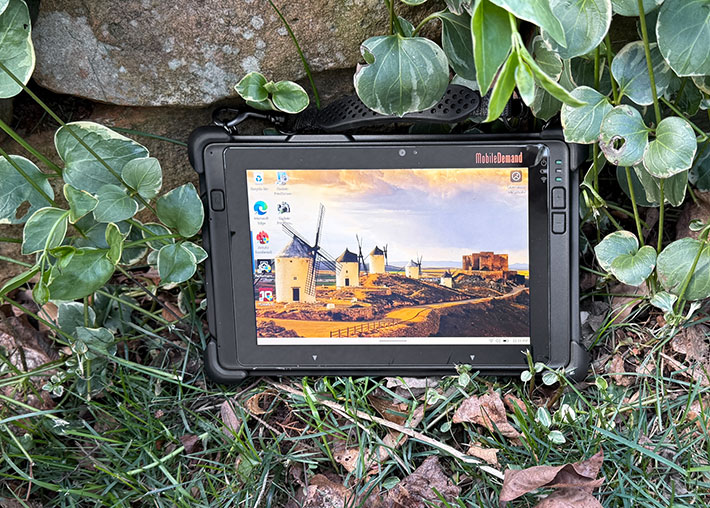
A resolution of 1920 x 1200 — often referred to as WUXGA ("Wide Ultra Extended Graphics Array") or, more commonly today, FHD+ — provides a substantial increase in usable detail. While many larger laptops and even televisions still use 1920 x 1080, on an 8-inch display this higher resolution results in a pixel density of approximately 283 pixels per inch. That is more than 100 dpi higher than the T8650's display, making the new screen significantly sharper and far better suited to modern Windows applications.
Brightness is equally important, particularly for outdoor use. Here, too, the T8655 represents a major step forward, with a rated luminance of 650 nits compared to 370 nits on its predecessor — an increase of roughly 75 percent. In our testing, the display reached a peak brightness of 665 nits, essentially matching its specification. Black levels are also excellent: we measured just 0.27 nits for full black, resulting in strong contrast and deep, true blacks rather than the washed-out grays often seen in lesser panels.

Viewing angles are another critical factor in real-world tablet use. Unlike laptops, which are typically viewed head-on, tablets are often used from a wide range of angles in the field. Lower-quality displays can suffer from brightness loss, color shifts, or reduced contrast when viewed off-axis. The T8655's display performs very well in this regard, maintaining consistent image quality across both horizontal and vertical viewing angles.
Reflections and glare remain an inherent challenge. While display brightness helps mitigate the issue, the T8655 uses a glossy display surface, as do most modern tablets, to enhance color vibrancy and perceived contrast. The trade-off is increased reflectivity. Matte or semi-matte coatings can reduce reflections, but at the cost of some image clarity and contrast. As such, managing reflections remains a balancing act, and one that users have largely learned to accommodate.
The images below illustrate the display at various viewing angles. Image quality remains stable even off-axis, though reflections can be present depending on lighting conditions.

Workable dual cameras
The intriguing RealSense 3D camera may be gone, but the xTablet T8655 still includes two onboard cameras, as is standard for most tablets and handheld devices today. A user-facing 2-megapixel camera supports video conferencing, while the rear-facing 8-megapixel camera, equipped with an LED flash, is intended for documentation tasks. Despite the otherwise significant platform update, camera resolution remains unchanged from the earlier T8650.
Cameras integrated into rugged tablets have historically lagged behind those found in smartphones — even entry-level phones now routinely deliver excellent image and video quality. While there has been some improvement over the years, it is generally not sufficient to match the performance of modern smartphones for documentation purposes in the field. This remains somewhat puzzling, given how mature and accessible high-quality camera technology has become.

As in the past, it is difficult to fully assess the true capabilities of the T8655's cameras. The default Windows Camera app remains very basic, offering limited control and making it challenging to determine how much of the final image quality is due to the hardware versus the software. On Android, users can choose from a wide range of alternative camera applications, but that flexibility is largely absent in the Windows ecosystem.
In our testing, we used the highest available 16:9 still image setting of 3264 x 1836 pixels, which corresponds to roughly 6-megapixel output. Video recording ranges from 480p up to 1080p. In still photography, autofocus performed reasonably well but required careful handling, with exposure sometimes shifting between under- and overexposed states. With some attention and practice, acceptable results were achievable.
Video performance was adequate for general use, though the system struggled with rapid motion and occasionally lagged in exposure adjustment. Overall, it remains unclear to what extent the limitations observed are due to the imaging hardware itself or the constraints of the Windows Camera software.
Below are sample images captured with the xTablet T8655 at its 6-megapixel setting. Click the image to view the full-resolution compilation.

Remarkable ruggedness
Unlike MobileDemand's Flex series, which combines consumer-grade tablets with rugged protective enclosures, the xTablet T8655 is a purpose-built rugged device. So what can it handle that the Flex tablets cannot?
 The drop specification provides a clear answer. The T8655 meets MIL-STD-810G, Method 516.6, Procedure IV, which requires 26 repeated drops onto plywood over concrete from a height of 48 inches. This is widely considered the industry baseline for rugged mobile devices, as it approximates a drop from hand-held use while standing or walking. The drop specification provides a clear answer. The T8655 meets MIL-STD-810G, Method 516.6, Procedure IV, which requires 26 repeated drops onto plywood over concrete from a height of 48 inches. This is widely considered the industry baseline for rugged mobile devices, as it approximates a drop from hand-held use while standing or walking.
The T8655 goes a step further, with a drop rating of up to five feet. That additional margin may not sound significant, but in real-world use it can be. While a typical drop during use occurs from about four feet, the extra headroom increases the likelihood of survival under less-than-ideal conditions. The picture to the right is from a video that shows MobileDemand's drop testing process.
The operating temperature range of 14°F to 122°F is also somewhat broader than that of the Flex 10C (23°F to 122°F). While the difference may appear modest, it can matter in environments such as cold storage or outdoor winter use.
The most significant distinction between the xTablet T8655 and the lower-cost Flex models, however, is sealing. Despite their protective housings and well-designed port covers, Flex tablets are not fully sealed and do not carry an Ingress Protection rating. As a result, they are not intended for use in rain or wet environments.
The xTablet T8655, by contrast, is rated IP65. This means it is fully protected against dust ingress and can withstand low-pressure water jets from any direction. Depending on the application, that can make a critical difference in reliability and usability.
In short, while the Flex tablets may resemble rugged devices, the xTablet T8655 is engineered as one.
As is often the case in this segment, manufacturers provide limited detail on ruggedness beyond headline specifications, making direct comparisons more difficult than they should be.

Bottom line: MobileDemand xTablet T8655
The MobileDemand xTablet T8655 replaces the long-running xTablet T8650. It retains the same compact and highly portable form factor, but internally it is an entirely new platform, built on current-generation technology that delivers substantially higher performance.

At a time when few rugged tablets are available in the 8-inch class, the T8655 occupies a niche almost of its own. For organizations that value this size and form factor, it represents a compelling option.
While outwardly similar to its predecessor, the improvements go well beyond internal components. The display has significantly higher resolution and brightness, resulting in a much sharper image and improved usability, particularly in outdoor environments.
The new model is somewhat heavier, largely due to its substantially higher-capacity battery. In our testing, the T8655 comfortably delivered more than a full shift of continuous operation. For extended use, an optional higher-capacity battery is also available.
Performance is markedly improved over the previous generation, with some benchmarks showing gains of more than threefold. At the same time, the T8655 is designed for consistent, reliable operation rather than peak performance in compute-intensive workloads such as advanced graphics or AI processing.
Connectivity is modern and flexible. The tablet includes dual USB-C ports (one of which supports charging), a USB Type-A port, and an RJ45 LAN connection. While the RealSense 3D camera option is no longer available, the device retains front and rear cameras suitable for conferencing and general documentation. A wide range of integrated options — including barcode scanning, magnetic stripe reading, NFC, and mobile broadband — as well as an extensive ecosystem of docks and accessories, allow the T8655 to be configured for a variety of specialized tasks.
MobileDemand designed the xTablet T8655 specifically for front-line work — in warehouses, distribution centers, manufacturing, field service, and similar environments where consumer-grade devices are not sufficient. In that role, the T8655 is well equipped to deliver. -- Conrad H. Blickenstorfer, March 2026
Specifications - MobileDemand xTablet T8655
Below are the detailed specifications of the MobileDemand xTablet T8655.
| Type |
Rugged 8-inch Windows tablet |
| Press release |
MobileDemand media release Oct. 14, 2025 |
| Added |
Full review 3/2026 |
| Processor |
Quad-core Intel "Alder Lake-N" Processor N100 |
| Processor speed |
3.40GHz max turbo frequency |
| Scenario Design Power |
6 watts |
| Display Chipset |
Intel UHD Graphics (24EUs) |
| OS |
Windows 11 Pro or 11 IoT Enterprise LTSC |
| Memory |
16GB LPDDR5 |
| Display |
IPS LCD with 650 nits backlight |
| Display size/res |
8.0-inch 1920 x 1200 WUXGA (283 ppi, 16:10 aspect ratio) |
| Digitizer |
10-point capacitive multi-touch with glove touch and anti-water drop, capacitive stylus, optional digitizer |
| Keyboard |
Onscreen keyboard + optional external |
| Storage |
256GB/512GB/1TB PCIe SSD |
| Expansion slots |
1 x microSD card reader |
| Housing |
Est: Polycarbonate housing with integrated protective rubber bumpers, aluminum internal frame |
| Size |
9.20 x 5.87 x 0.87 inches (235 x 149 x 22mm) |
| Weight |
2.65 lbs. base configuration |
| Operating temperature |
14° to +122°F (-10° to +50°C) |
| Ingress protection |
IP65 |
| Drop/shock |
MIL-STD 810G, 516.6 IV: 26 repeated drops to 1 operating unit onto plywood over concrete from 60 inches |
| Tumble |
1M tumbles |
| Vibration |
Unknown |
| Regulatory |
FCC, IC, CE, WEEE, RoHS |
| Power |
Standard: 7.68V 8340mAH 64 watt-hours ("up to 12 hours"), XL battery: 7.40V 14200mAH 98 watt-hours ("up to 16 hours"), hot-swappable via 150mAH backup battery |
| Cameras |
2mp front camera, 8mp rear camera with autofocus and LED flash |
| Data capture |
Optional integrated high performance Honeywell N6803MR barcode scanner |
| Sensors |
Gyro, accelerometer, E-compass |
| Interface |
1 x USB 3.2 Gen 2 Type-A, 2 x USB 3.2 Gen 2 Type-C (one supporting charging / PD-in and display output), 3.5mm audio, RJ45 LAN, 19-pin pogo docking, 2 x internal USB |
| Wireless |
Intel Wi-Fi 6E AX211, Bluetooth 5.3, GPS/GLONASS/GALILEO |
| Price |
Contact vendor / configuration dependent |
| Warranty |
1 year limited warranty |
| Contact/web |
MobileDemand xTablet T8655 web page |
| Brochure |
 xTablet T8655 PDF spec sheet xTablet T8655 PDF spec sheet |
(copyright 2026 RuggedPCReview.com)
|
|
|
|

