Dell Pro Rugged 12 Tablet
Next-generation rugged computing in a refined 12-inch tablet design.
(by Conrad H. Blickenstorfer)
On October 7, 2025, Dell introduced the new Dell Pro Rugged 10 and 12 tablets — almost exactly two years after unveiling the Latitude 7030 Rugged Extreme Tablet, which had been positioned as a smaller companion to the 12-inch Latitude 7230 Rugged Extreme. With the arrival of these new models, Dell once again fields a modern rugged tablet duo in the intensely competitive vertical market for heavy-duty field tablets — or, as Dell describes it, devices built for environments such as manufacturing floors, utility pole work, and emergency response operations.
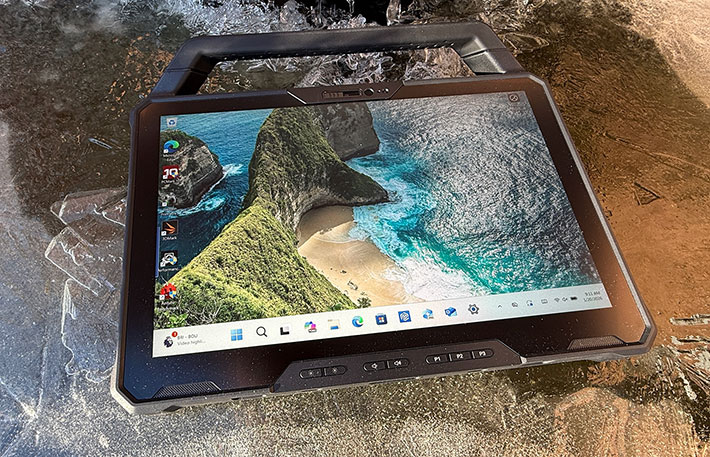
The two new tablets represent the most common rugged tablet size categories — 10-inch displays for minimal size and weight, and 12-inch screens for situations where deployments and applications benefit from a larger viewing area. Performance-wise, the two models share identical specifications, and despite their different physical sizes, both use the same 1920 × 1200 pixel display resolution.
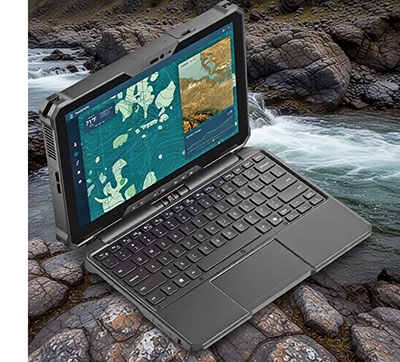 As expected, the 12-inch version is noticeably larger and heavier than the 10-inch model, and depending on the task or user preference, that difference can be significant. The 12-inch tablet has a starting weight of 2.89 pounds, whereas the smaller model begins at 2.29 pounds.
Taking a closer look at size and weight, the 12-inch tablet provides about 41% more screen area than its smaller sibling. That makes it particularly well suited for deployments where a larger display is beneficial and the device is used primarily in a fixed or semi-stationary role. The smaller and lighter 10-inch tablet, on the other hand, is often the better choice for highly mobile work where the device may be carried or handled throughout the day.
Overall, when it comes to mobile computing, there is no single screen size that works best for everyone. Even modest differences in size can determine whether a device feels comfortable and well balanced or slightly off. Smartphones illustrate this well: over the years they have grown large enough to handle the wide range of tasks we now expect from them, yet not so large as to become awkward to use. Even so, they continue to be offered in several display sizes to accommodate different hands, eyesight, and usage preferences.
Tablets follow much the same principle. What feels just right to one user may seem too large or too small to another, and certain applications clearly benefit from one screen size over another. For that reason, it makes sense to offer Windows tablets in both of the dominant rugged size classes — 10-inch and 12-inch. Most competitors in the rugged Windows tablet market cover both categories, and with the Dell Pro Rugged 10 and 12, Dell once again maintains a presence in each segment.
Personal preference, however, is only part of the picture. A device must also be capable of performing the tasks required of it — and doing so reliably. That makes it important to understand both its capabilities and its limitations. The table below shows how the Dell Pro Rugged 10 and 12 tablets compare with one another.
|
Dell Latitude
|
Dell Pro Rugged 10
|
Dell Pro Rugged 12
|
|
|

|

|
|
Launched
|
October 2025
|
October 2025
|
|
Intel Core CPU generation
|
Intel "Lunar Lake" Core Ultra Series 2
|
Intel "Lunar Lake" Core Ultra Series 2
|
|
Available CPU options
|
Ultra 5 226V, 236V and 238V, Ultra 7 266V and 268V
|
Ultra 5 226V, 236V and 238V, Ultra 7 266V and 268V
|
|
Display
|
10.1" 1920x1080 (224 ppi)
|
12.0" 1920x1200 (189 ppi)
|
|
Aspect ratio
|
16 : 10
|
16 : 10
|
|
Luminance
|
1000 nits (1090 as tested)
|
1200 nits (1320 as tested)
|
|
Size
|
10.33 x 7.40 x 1.00 inches
|
11.85 x 8.19 x 1.17 inches
|
|
Weight
|
from 2.29 lbs.
|
from 2.89 lbs.
|
|
RAM
|
up to 32GB LPDDR5x
|
up to 32GB LPDDR5x
|
|
Mass storage
|
up to 2TB PCIe NVMe
|
up to 2TB PCIe NVMe
|
|
Wi-Fi
|
Wi-Fi 7BE + Bluetooth 5.4
|
Wi-Fi 7BE + Bluetooth 5.4
|
|
Power
|
2 x 18 whr Li-Ion
|
2 x 35.6 whr
|
|
Battery Life
|
PCMark 10 battery test: 13:42 hrs (36.0 whr)
|
PCMark 10 battery test: 13:51 hrs (71.2 whr)
|
|
Cameras
|
opt. 8 and 11mp
|
opt. 8 and 11mp
|
|
USB Type A
|
1 x USB 3.2 Gen 1
|
2 x USB 3.2 Gen 1
|
|
USB Type C
|
2 x USB 4
|
2 x Thunderbolt 4
|
|
Expansion
|
RJ45, USB-A, scan
|
RJ45, HDMI, scan, COM, Fischer
|
|
Handle
|
Opt. soft or rigid
|
Opt. soft or rigid
|
|
Kickstand
|
fixed angle
|
fixed angle
|
|
Programmable buttons
|
2
|
3
|
|
Sealing
|
IP66
|
IP66
|
|
Transit Drop
|
4-feet
|
4-feet
|
As the comparison illustrates, the two tablets are very closely related. Their core technology specifications are essentially the same, and they share identical ruggedness ratings, port selections, and connectivity options. The 12-inch model weighs roughly half a pound more, its display is rated slightly brighter (though the practical difference between 1,000 and 1,200 nits is fairly small), and — somewhat unexpectedly — the smaller 10-inch version uses USB4 ports while the 12-inch model comes with Thunderbolt 4, both implemented through Type-C connectors. Despite the considerably smaller batteries in the 10-inch tablet, both versions delivered about the same battery life in our testing.

One aspect that quickly becomes apparent is how easily Dell allows both tablets to function either as standalone slates or as full laptop systems when paired with the optional keyboard. That is important because 2-in-1 devices represent a growing portion of the tablet market, and the way this capability is implemented can significantly affect real-world usability — and ultimately market acceptance.
Two-in-one concepts have existed almost as long as Windows tablets themselves. Some systems use "connected" designs where the tablet and keyboard remain physically integrated, with the display repositioned to switch between laptop and tablet configurations. The benefit of this approach is that the keyboard is always attached and available. The tradeoff, however, is weight: connected designs tend to be heavier and bulkier.
Dell itself offered such a connected rugged 2-in-1 about a decade ago: the original Latitude 12 Rugged Extreme (see our 2015 review). With the new Pro Rugged 10 and 12 tablets, Dell opted for a different strategy. Here, the tablet and the optional keyboard are separate components that can be combined to create a fully functional laptop. Compared to wireless or generic USB keyboards — which often feel like add-ons and require awkward tablet propping — Dell's implementation is considerably more integrated and practical. The images below illustrate how the concept works.

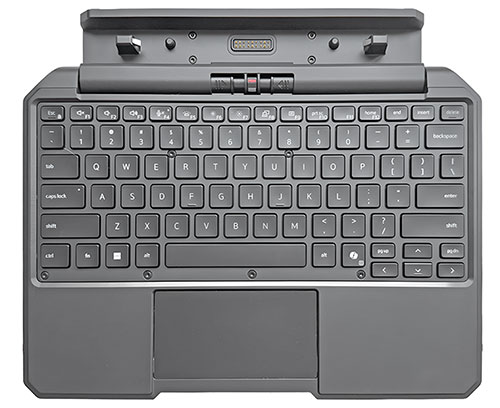
The keyboard is designed specifically for the Pro Rugged 12 tablet, which snaps into the hinged base so the combination functions very much like a conventional laptop. The keyboard also provides additional ports — there are a USB 3.2 Gen1 Type-A port and an RJ45 LAN jack on the right side of the keyboard, and two additional USB 3.2 Gen1 Type-A ports on the left, one of which also with PowerShare. Paired with the optional carry handle, the Pro Rugged 12 can easily be taken along anywhere. When needed it behaves just like a laptop, yet it can just as easily be detached and used as a lightweight, convenient tablet.
 There are, however, a couple of considerations to keep in mind. One is inherent in nearly all 2-in-1 designs: because the tablet portion contains not only the display and electronics but also the battery, the combined tablet-and-keyboard unit tends to be top-heavy. As a result, the screen can only tilt back so far before the system risks tipping over.
The second point concerns the keyboard layout itself. Unlike the 10-inch tablet's 92.5% scale keyboard, the 12-inch model provides a full-size QWERTY section. That matters to touch typists as well as to experienced hunt-and-peck users whose muscle memory expects the distance between the centers of the Q key on the left and the P key on the right to measure exactly 6.75 inches. For customers who spend a lot of time typing, that difference can be significant.
There is also another accessory option worth mentioning: Dell's simple tablet stand. This inexpensive solution is well suited for users who only need a stand or who intend to use the Pro Rugged 12 with a wireless or USB keyboard. The stand allows the viewing angle to be adjusted to three positions.
The Dell Pro Rugged 12 and Dell's rugged products design, look, and feel
Dell's rugged tablets were traditionally part of the company's Latitude line of business laptops, and previous-generation models such as the Latitude 7030 and 7230 can still be found within the Latitude Rugged laptops and tablets section of Dell's website. Navigating Dell's current rugged lineup online, however, can be somewhat confusing. Depending on where you enter — whether through dell.com/rugged or the Dell Technologies online store — rugged systems appear under slightly different branding and navigation paths. We wish Dell were more transparent and consistent about where its rugged lineup fits within the broader organization and how it relates to the rest of the portfolio.
Overall, Dell's Rugged and Rugged Extreme laptops and tablets — formerly branded clearly as Latitude systems and now positioned within the broader Dell Pro family — are not merely reinforced versions of standard enterprise computers. While rugged models may share certain components or technologies with other Dell Pro systems, they are fundamentally distinct designs, engineered from the ground up for operation in harsh environments.
This difference becomes apparent immediately in the product design. Whereas conventional Dell Pro business systems emphasize a sleek, contemporary consumer-enterprise aesthetic, Dell's rugged devices follow a different and more purposeful design language. The rugged tablets are visually and physically distinct, placing priority on durability, protection, and functional clarity.
Dell has done an excellent job visually separating its rugged offerings from mainstream enterprise platforms while still delivering a sharp, cohesive, and surprisingly refined design. Rather than leaning heavily into an overtly utilitarian or industrial look — as some competitors do — Dell opts for a more polished, high-quality appearance. In hand, the tablet feels tough, solid, and substantial, leaving no doubt that it is built as a much heavier-duty computing device than any typical consumer or business tablet.
But let's take a closer look at the Dell Pro Rugged 12 tablet. Below, you can see the top and all four sides of the device:

Dell uses a single color scheme here — black. The housing is made of reinforced polycarbonate plastic, with the front bezel and sides finished in a matte, rubberized coating. Protective corner bumpers are neatly integrated into the overall design. Because the tablet uses a capacitive touchscreen, the front glass extends flush beyond the actual LCD perimeter, exactly as it should for comfortable touch operation. The surrounding housing bezel rises slightly at an angle, providing additional screen protection without interfering with finger movement. The glass surface itself is glossy, though in a subdued, non-distracting way.
Beneath the display — clearly intended for use in landscape orientation — are five physical buttons labeled +, -, P1, P2, and P3. This represents a small but potentially relevant difference between the 10-inch and 12-inch models. The 10-inch tablet includes only two programmable buttons, whereas the 12-inch version offers three.
The +/- buttons can be configured to control either volume or brightness, or both functions via short and long presses. The P1, P2, and P3 buttons are fully programmable and can be assigned to virtually any function, including macros. All labels are crisp and easy to read. The front-facing camera is centrally positioned, where it belongs, and it includes a manual privacy shutter.
Ports and connectivity are arranged along the right and top edges of the tablet. To guard against physical damage and environmental exposure, all ports sit behind snap-in protective covers.
The image below shows the right side of the unit with the protective covers removed for a clear view of the available ports. From left to right, there is the stylus garage, followed by a Kensington-style lock slot, an (optional) HDMI 2.1 port for external video, a USB 3.2 Gen 1 Type-A port with power share and a microSD card slot below it, and finally a global headset jack.

The left side of the Pro Rugged 12, shown below, shows the fan air intake, and then two Thunderbolt 4 ports with DisplayPort Alt Mode, USB4 functionality as well as power delivery. Note the two screw holes above the TB4 ports. Those are for special, rugged USB-C connectors with screws.

Capacitive multi-touch — works with gloves
The Dell Pro Rugged 12 tablet, like virtually all modern tablets, supports 10-point capacitive multi-touch. Tapping, panning, swiping, pinching, and zooming all work smoothly and responsively, without the slight latency that once affected touch input on Windows-based systems. The capacitive touchscreen also responds well to gloved operation, and the display surface feels as smooth as expected from current capacitive touch technology.
The tablet ships with a 5.5-inch capacitive stylus. Over the years, Dell has experimented with several stylus designs. The older Latitude 7212 tablet used a narrow 3 mm hard rubber tip, the 7220 switched to a firmer 6 mm tip, and the more recent 7030 and 7230 models included a slightly narrower 5 mm hard tip in a short, flat, 4-inch stylus.
Of the two review units Dell provided, the smaller 10-inch version came with a longer, round stylus featuring a 5 mm tip, whereas the 12-inch model shipped with the flat, 4-inch stylus that fits neatly into a garage on the right side of the tablet. A 10-inch coiled tether helps prevent it from getting lost in the field. 
Dell also offers an optional active pen, though the company does not specify which active pen technology is used. In practice, the tablet's capacitive multi-touch proved fast and accurate enough for most tasks, even though we often found ourselves reaching for the stylus as well.

A look inside
Rugged Windows tablets look very different inside from iPads or Android devices. In those platforms, most of the interior space is taken up by a large, flat battery alongside a handful of tiny, highly integrated electronics. Windows tablets, by contrast, still resemble small laptops internally. That is hardly surprising, since a Windows tablet is essentially a full PC compressed into a slim, compact enclosure — something Dell has extensive experience with. Even though electronics continue to shrink and integrate, opening a modern tablet such as the Dell Pro Rugged 12 still reveals what looks very much like a PC, with numerous wires, connectors, components, and modules.
 The challenge for designers and manufacturers of rugged Windows tablets goes well beyond simply fitting an entire PC with all its connectivity into a compact package. The system must also be carefully sealed against dust and liquids, and structurally reinforced to withstand drops and vibration.
Given Dell's status as one of the world's top PC makers — they are usually third behind only Lenovo and HP — you'd think the company would simply start with one of their standard enterprise laptop designs and then put that into a smaller, sturdier and better sealed tablet housing. But laptops are laptops and tablets are tablets — a different types of devices — and Dell doesn't currently make any enterprise 12-inch laptops they could borrow from.
As a result, Dell's rugged tablets, both the 10-inch and 12-inch models, appear to exist as a distinct product line rather than being closely derived from the company's mainstream enterprise systems. The current versions of both tablets look more like evolutionary updates of their predecessors than entirely new designs. Unlike Panel PCs, which often use identical internal boards across different display sizes, Dell's 10-inch and 12-inch rugged tablets are not simple scaled versions of one another. They may share the same processors and modules — and even follow a similar layout philosophy — but one is not merely an enlarged or reduced copy of the other. While the two tablets look almost identical externally aside from size, internally nearly everything is arranged and optimized to make the best use of the available space.
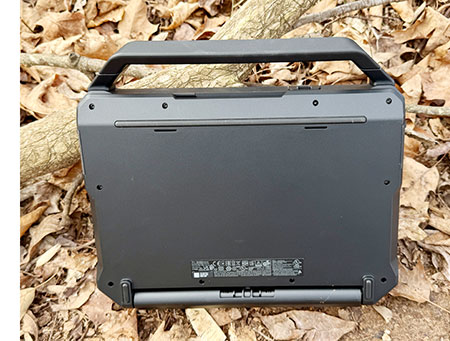
Unlike most Windows laptops and many tablets, the Dell Pro Rugged 12 tablet does not have multiple removable access panels on its back for memory or expansion slots. That means that adding or replacing components, or performing maintenance, requires opening the tablet itself. Even then, the RAM is soldered to the board, and storage is not easily replaced. At the time of purchase, however, the primary internal storage of the Dell Pro Rugged 12 tablet can be configured as a user-replaceable removable SSD. This allows the primary drive to be quickly removed for secure storage when the tablet is not in use, or for transferring data to another compatible system.
Opening the unit itself is straightforward (provided you have a Torx T8 screwdriver bit). Removing about 20 small screws allows the two halves of the housing to separate — though it is important to remove the SIM card or its plastic placeholder first. Two ribbon cables connect the halves: one for the battery and another for the fingerprint reader located on the back of the tablet.
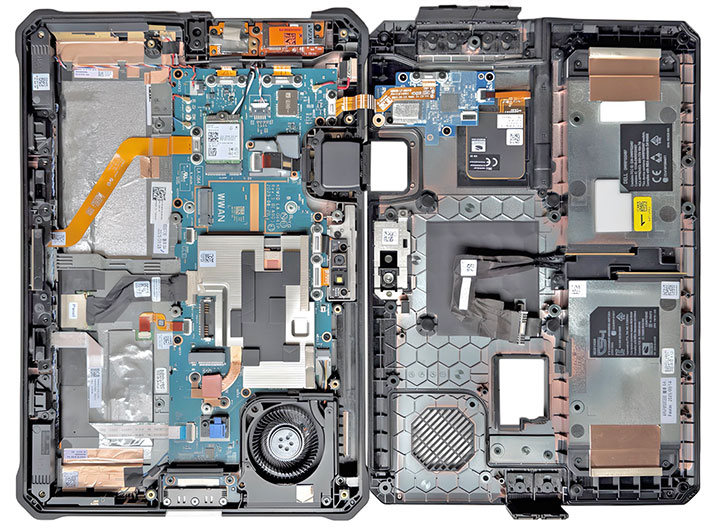
The seal between the back and front halves of the housing — both made of impact-resistant, flame-retardant, glass fiber-reinforced PC-GF20FR(40) polycarbonate — consists of a hard plastic lip on the rear section that presses against a thin black rubber O-ring seated in a channel on the front portion. (We would actually prefer the seal to be in a contrasting color, as that would make it much easier to inspect for damage.) The O-ring itself is long and fairly intricate but appears to be replaceable. One interesting detail is that the seal does not simply run around the perimeter of the tablet. Instead, it winds in and out across the interior layout, protecting the main electronics while leaving I/O-related components outside the sealed area.
 The reason for this approach is that sealing rugged tablet ports and connectors reliably is not easy. In many rugged devices, those ports are not fully sealed to the interior. Instead, rubber plugs or hinged doors provide the only protection. If one of those covers is not properly closed, liquids can make their way into the device. With Dell's design, that cannot happen. Note the red highlight in the image to the right: it marks the seal that keeps liquids out even if a port cover fails or is accidentally left open.
Considering how easy it is for a port cover to be left slightly open, Dell's solution is more complex but also more robust. In the worst case, any potential damage would be limited to a replaceable I/O module rather than the entire tablet. And even that risk is mitigated by Dell's use of what it calls HZO liquid protection, described as a "nanotechnology solution that inoculates electronic components from damage and failure."
Another advantage of separating the I/O modules from the motherboard is flexibility. This modular approach makes it much easier to upgrade or customize connectivity without redesigning the main board.
The internal layout of the Dell Pro Rugged 12 tablet is fairly complex, although certain components — such as the WiFi module (our unit included an Intel Wi-Fi 7 BE201 + Bluetooth 5.4 card) and the PCIe NVMe SSD storage — are somewhat easier to access than in the smaller 10-inch version. The socket for optional wireless modules, as well as the various antenna assemblies, are all clearly visible once the tablet is opened.
Overall, component modularity has long been part of Dell's engineering philosophy, shaped by decades of offering an enormous range of configuration options directly on its website. As a result, almost any feature for which alternatives might exist — or where customers may want more or less functionality — is implemented as a separate module rather than being permanently integrated into the motherboard.
 One aspect that immediately stands out is the Dell Pro Rugged 12 tablet's thermal management system. This includes a small fan housed within a plastic enclosure that, as expected, is sealed toward the interior of the device (see the red highlight). A shiny copper heat pipe — only a small section of which is visible — conducts heat away from the processor, supporting electronics, and the PCIe-based SSD.
Paying close attention to thermal management is a crucial part of modern electronics. Back in 2015, the original Dell Rugged Tablet only had a tiny fan and no heat pipes. The new tablets have bigger fans and much more comprehensive thermal management. Why is that? It's because the original tablet's processor had a Thermal Design Power (a measure of CPU performance) rating of just 4.5 watt, whereas the one in this new tablet is much high-power chip with max turbo Thermal Design Power of up to 37 watts.
Careful thermal management is a crucial element in modern electronics design. Back in 2015, the original Dell Rugged Tablet relied on only a small fan and did not include heat pipes. The new tablets feature larger fans and far more sophisticated thermal management. The reason is straightforward: the processor in that earlier tablet had a Thermal Design Power, which is a rough indicator of CPU performance, of just 4.5 watts, whereas the processor in the new tablet is a significantly more powerful chip with a maximum turbo Thermal Design Power of up to 37 watts.
The new processors that generate all that performance are no longer classified by Intel as "ultra-low voltage." These days the focus is on achieving the right balance between high performance and power efficiency. Years ago, Intel's ultra-low voltage processors did not include the "turbo" capability that allows CPUs to briefly run much faster than their nominal clock speed, as long as temperatures remain within acceptable limits.
Much like in cars, turbo is a wonderful thing — but it requires proper cooling and management. If a rugged tablet overheats in the field and lacks active cooling, the processor will reduce its speed to protect itself, resulting in lower performance. That is why Dell chose to equip the Pro Rugged 10 and 12 tablets with a relatively powerful internal fan.

The images above illustrate the Dell Pro Rugged 12's thermal engineering, captured with our infrared camera during a demanding PCMark 10 benchmark run.
The bright yellow areas indicate the highest temperatures, marking where heat is carried away from the electronics through the system's thermal pipes. On the left is the front of the tablet, where the hottest spot does not even reach normal human body temperature. On the right is the back of the tablet, showing the fan intake and exhaust area. Here we recorded maximum temperatures in the mid-80s °F — noticeably lower than what we observed in the predecessor Latitude 7230 Rugged Extreme Tablet, and also somewhat lower than on the smaller Dell Pro Rugged 10 tablet.
The bottom line from this internal inspection of the Dell Pro Rugged 12 tablet is that it represents a complex and sophisticated design that highlights Dell's extensive experience in mobile computing engineering. Components and modules are clearly labeled and each carries its own 2D scan code. The wires running from modules to their respective antennas — located around the perimeter of the tablet for optimal reception — are carefully routed and secured with small loops and guides. What appears to be a magnesium frame adds further strength and rigidity without making the tablet excessively heavy or giving it an overly bulky, tank-like appearance.

Intel "Lunar Lake" Core Ultra Series 2 power
Like its smaller Pro Rugged 10 sibling, the Dell Pro Rugged 12 tablet is powered by Intel "Lunar Lake" Core Ultra Series 2 processors. Lunar Lake belongs to Intel's 15th generation of Core processors and is more specifically identified as the Core Ultra 200V series.
Choosing the right processor for a new product — or even for an updated version of an existing one — is anything but simple for hardware manufacturers. Numerous factors must be weighed, including performance, power consumption, cost, thermal limits, and how well a given platform fits the intended markets and customer profiles. It is a complicated balancing act, and Intel's rapid release cadence — along with its frequent reshuffling of product lines, architectures, and naming conventions — does not make the decision any easier.
Over the years, processor designs have evolved rapidly. Core counts progressed from single-core to dual-, quad-, and eventually eight-core configurations, sometimes with multiple threads per core and sometimes without. Turbo Boost followed, allowing processors to conserve power under light workloads and then accelerate aggressively when additional performance is needed. More recently, Intel introduced hybrid architectures that combine high-performance cores with power-efficient ones— an approach long used in smartphone SoCs and conceptually similar to hybrid vehicles that rely on different power sources depending on operating conditions.
 Today, the spotlight has shifted decisively toward artificial intelligence. In the early days of personal computing, the CPU handled almost all processing tasks. As graphics workloads became more demanding, GPUs were introduced to efficiently process highly parallel operations. Now a third specialized engine has entered the picture: the NPU, or Neural Processing Unit, designed specifically for AI workloads and typically measured in TOPS rather than conventional clock speeds.
As these architectural developments accumulated, Intel's long-standing practice of organizing processors strictly by numbered "generations" became increasingly difficult to track. The 14th generation, for example, included both refreshed versions of Intel's traditional hybrid processors — codenamed Raptor Lake Refresh — and the newer Meteor Lake designs marketed as Core Ultra. Those Core Ultra processors also introduced dedicated NPUs, which Intel refers to as Intel AI Boost, signaling the company's broader move toward AI-capable client platforms.
 The pace of change in AI computing has been so rapid that Intel moved quickly once again — very likely in response to Microsoft's 40-TOPS requirement for Copilot+ PC certification. The result was Core Ultra Series 2, which represents the next major step in Intel's client processor roadmap. Within this generation, the lineup is split between Arrow Lake, aimed at higher-performance systems, and Lunar Lake, designed for ultra-low-power mobile platforms.
Adding to the complexity, Core Ultra Series 2 processors come in several variants tailored to different usage profiles. There are H-series chips intended for higher-performance mobile systems, U-series parts designed for thin-and-light devices, and V-series processors optimized for AI-focused mobile platforms. Even that does not tell the full story, as Intel equips some Series 2 processors with standard integrated graphics, while others feature the considerably more capable Intel Arc graphics architecture.
For the Dell Pro Rugged 12, Dell offers no fewer than five processor options, all of them mobile V-Series variants. These processors have fewer cores and lower thermal design power than the higher-end Arrow Lake desktop versions of the Core Ultra Series 2 family. Interestingly, while the desktop-class chips deliver greater conventional CPU performance, the V-Series mobile processors include substantially more powerful GPUs and NPUs.
For example, the most powerful "traditional" Arrow Lake desktop processors top out at roughly 36 TOPS despite offering as many as 24 total cores. By contrast, V-Series mobile processors with just eight total cores can reach up to 118 TOPS. The reason is straightforward: the V-Series combines much more capable NPUs with Intel Arc GPUs, whereas the desktop processors rely on Intel Graphics and more modest NPU implementations.
The table below shows the five processors available for the Dell Pro Rugged 12 Tablet, with their major specs (see the full table here):
|
CPU
|
Intel Core Ultra 5 Series 2
|
Intel Core Ultra 5 Series 2
|
Intel Core Ultra 7 Series 2
|
Intel Core Ultra 7 Series 2
|
Intel Core Ultra 7 Series 2
|
|
Model
|
226V
|
236V
|
238V
|
266V
|
268V
|
|
P-Cores
|
4
|
4
|
4
|
4
|
4
|
|
E-Cores
|
0
|
0
|
0
|
0
|
0
|
|
Low Power E-Cores
|
4
|
4
|
4
|
4
|
4
|
|
Total Threads
|
8
|
8
|
8
|
8
|
8
|
|
P-cores Max Turbo
|
4.50 GHz
|
4.70 GHz
|
4.70 GHz
|
5.00 GHz
|
5.00 GHz
|
|
E-cores Max Turbo
|
3.50 GHz
|
3.50 GHz
|
3.50 GHz
|
3.70 GHz
|
3.70 GHz
|
|
Thermal Design Power
|
17/37 watts
|
17/37 watts
|
17/37 watts
|
17/37 watts
|
17/37 watts
|
|
Smart Cache
|
8MB
|
8MB
|
8MB
|
12MB
|
12MB
|
|
Integrated graphics
|
Intel Arc 130V
|
Intel Arc 130V
|
Intel Arc 130V
|
Intel Arc 140V
|
Intel Arc 140V
|
|
GPU Peak TOPS
|
53
|
53
|
66
|
66
|
66
|
|
Graphics max speed
|
1.85 GHz
|
1.85 GHz
|
1.85 GHz
|
2.00 GHz
|
2.00 GHz
|
|
NPU Peak TOPS
|
40
|
40
|
40
|
48
|
48
|
|
Intel vPro
|
Enterprise
|
Enterprise
|
Enterprise
|
Enterprise
|
Enterprise
|
At first glance, Dell's decision to use Intel Core Ultra Series 2 V-series processors may appear somewhat surprising. These chips top out at eight cores, whereas other Series 2 processors can offer as many as 24. The difference comes down to priorities. The V-series is not intended to maximize CPU core count but instead focuses on delivering a more balanced architecture with a strong emphasis on AI capability.
 Compared with higher-core-count alternatives, the V-series provides a significantly more powerful NPU that satisfies Microsoft's 40-TOPS requirement for Copilot+ PC certification, along with substantially stronger Intel Arc graphics. For a rugged tablet operating within tight thermal and power limits, this combination makes more sense than simply maximizing raw CPU throughput. It enables the Pro Rugged 12 to qualify as a Microsoft-sanctioned AI PC while positioning it well for emerging on-device AI, computer vision, and real-time analytics workloads — all while maintaining efficiency, sustained performance, and reasonable battery life.
In practice, there is not a great deal of difference among the five available processor options. All share the same eight-core, eight-thread configuration and include hardware-accelerated Intel Arc graphics. The main differences lie in clock speeds, cache size, memory support, and the level of GPU integration, which can produce small but measurable performance differences. The Ultra 7 processors feature Arc 140V graphics and therefore deliver slightly higher vector and graphics performance than the Ultra 5 variants, which use Arc 130V graphics.
How well does the Dell Pro Rugged 12 perform against the competition? That question is addressed in the benchmark table below, which compares the tablet's results with those of its Latitude Rugged Extreme 7230 predecessor as well as competing 12-inch-class rugged tablets from other industry leaders.
|
Dell Pro Rugged 12 Tablet vs 12-inch class rugged tablets
|
|
PERFORMANCE COMPARISON
|
Dell
|
Dell
|
Durabook
|
Durabook
|
Panasonic
|
Getac
|
Getac
|
|
Model
|
Pro Rugged 12
|
7230
|
R11
|
U11
|
TB 33
|
K120 G3
|
F120
|
|
Year tested
|
2026
|
2022
|
2022
|
2023
|
2024
|
2024
|
2025
|
|
Type
|
Tablet
|
Tablet
|
Tablet
|
Tablet
|
Tablet
|
Tablet
|
Tablet
|
|
Display size
|
12.0"
|
12.0"
|
11.6"
|
11.6"
|
12.0"
|
12.5"
|
12.0"
|
|
Display resolution
|
1920x1200
|
1920x1080
|
1920x1080
|
1920x1080
|
2160x1440
|
1920x1080
|
1920x1200
|
|
Luminance
|
1,320 nits
|
1,337 nits
|
1,246 nits
|
1,080 nits
|
1,220 nits
|
1,320 nits
|
1,060 nits
|
|
Processor Type: Intel
|
Core Ultra i7
|
Core i5
|
Core i7
|
Core i7
|
Core i7
|
Core i7
|
Core Ultra i7
|
|
Processor Model
|
268V
|
1240U
|
1255U
|
1250U
|
1270P
|
1365U
|
268V
|
|
Cores/threads
|
4/4
|
10/12
|
10/12
|
8/8
|
14/20
|
10/12
|
4/4
|
|
Max Turbo Speed
|
5.00 GHz
|
4.40 GHz
|
4.70 GHz
|
4.70 GHz
|
4.80 GHz
|
5.20 GHz
|
5.00 GHz
|
|
Thermal Design Power (TDP)
|
17/37 watts
|
9/29 watts
|
15/55 watts
|
9/29 watts
|
28/64 watts
|
15/55 watts
|
17/37 watts
|
|
Cooling
|
fan
|
fan
|
fan
|
fanless
|
fan
|
fan
|
fan
|
|
PassMark 9.0
|
6,216
|
5,516
|
5,602
|
4,154
|
5,552
|
5,569
|
6,328
|
|
CrystalMark
|
601,180
|
401,322
|
417,117
|
318,914
|
436,485
|
410,551
|
565,380
|
|
PCMark 10 Overall
|
7,283
|
4,847
|
5,359
|
4,051
|
5,055
|
4,991
|
7,448
|
|
- PCMark10 Essentials
|
10,438
|
9,776
|
10,485
|
8,370
|
9,527
|
9,198
|
10,340
|
|
- PCMark10 Productivity
|
9,571
|
6,416
|
7,248
|
6,052
|
6,758
|
6,705
|
10,793
|
|
- PCMark10 Content Creation
|
10,492
|
4,929
|
5,497
|
3,561
|
5,446
|
5,412
|
10,018
|
|
PCMark10 Drive
|
2,026
|
2,015
|
1,623
|
1,723
|
2,140
|
1,043
|
1,950
|
|
PCMark10 Battery (Hours)
|
13:51 hrs
|
11:51 hrs
|
5:32 hrs
|
5:41 hrs
|
6:34 hrs
|
6:57 hrs
|
14:03 hrs
|
|
PCMark10 Battery (whr/hr)
|
5.14
|
6.01
|
7.77
|
6.42
|
6.70
|
6.91
|
4.48
|
|
3DMark Time Spy
|
4,543
|
1,142
|
1,384
|
1,033
|
1,619
|
1,217
|
4,113
|
|
GeekBench 5 Single Core
|
2,868
|
1,496
|
1,586
|
1,394
|
1,524
|
1,632
|
1,998
|
|
GeekBench 5 Multi Core
|
11,062
|
7,049
|
5,747
|
4,181
|
7,795
|
6,499
|
9,817
|
|
GeekBench 5 Open CL
|
31,566
|
10,713
|
14,618
|
10,259
|
15,612
|
17,158
|
33,393
|
As always, the results in the table above should not be interpreted as an absolute ranking of which product is fastest. Each of the listed devices was or is available with multiple processor options, and some systems may have been updated since we last benchmarked them in the RuggedPCReview.com testing lab. The figures should therefore be viewed primarily as indicators of the performance levels that can be expected from different processor generations, architectures, clock speeds, and thermal design power envelopes.
What becomes clear, however, is that the Dell Pro Rugged 12 tablet is a very strong performer, matching or exceeding the performance of its current Tier-1 12-inch rugged tablet competitors. And while the Pro Rugged 12 looks outwardly very similar to its Latitude Rugged Extreme 7230 predecessor, the new model is considerably faster. Dell has managed to pack an impressive amount of computing power into this tough and highly portable machine, resulting in a system that clearly outperforms devices still based on older processors and platform technologies.
How does the Dell Pro Rugged 12 compare in terms of performance with its smaller 10-inch sibling? RuggedPCReview.com tested both models and found that, when similarly configured, the smaller tablet tends to be slightly quicker in most benchmark tests. The difference, however, is small and unlikely to make a meaningful difference in everyday use.

One important caveat should be noted: benchmark performance of the Pro Rugged 12 is significantly higher when the tablet is connected to AC power than when it is running on battery. Depending on the specific test, performance on external power can be 40 to 60% higher than battery-powered results. This appears to be a deliberate design decision by Dell, as we observed the same behavior in the smaller 10-inch version.
This is not accidental. Intel's Dynamic Tuning Technology (DTT) allows system manufacturers to configure different performance and power profiles depending on operating conditions. Dell seems to have tuned its Pro Rugged tablets for maximum performance when external power is available, and for improved runtime efficiency when operating on battery. That is a common strategy in rugged mobile systems where thermal and battery constraints are tighter than in conventional laptops.
The Pro Rugged 12 as an AI platform
On January 6, 2025, Michael Dell, chairman and CEO of Dell Technologies, spoke about AI PCs as a force that will shape the future of computing. Dell's accompanying press release described a rapidly evolving AI PC landscape, highlighting how many organizations want to run AI models trained on their own data locally on client systems rather than exclusively in the cloud. The idea is to improve efficiency, responsiveness, privacy, and control by keeping at least part of the AI workload on the device itself.
Just over a year later, it is safe to say that artificial intelligence is influencing almost every aspect of business and personal computing. Large language models have become widely accessible, and new AI-driven tools and services appear almost daily. The practical reality of so-called "AI PCs," however, is still developing. Both Intel and AMD now ship processors with integrated neural processing units (NPUs), yet relatively few mainstream applications currently take full advantage of on-device AI acceleration.
Much of the current discussion therefore revolves around Edge AI — bringing AI processing directly to local devices rather than relying entirely on cloud infrastructure. This approach is particularly relevant for rugged mobile systems, which are frequently deployed in environments with limited, intermittent, or expensive wireless connectivity. At the same time, computing platforms are clearly evolving toward heterogeneous architectures in which traditional CPUs handle general-purpose tasks while increasingly capable GPUs and NPUs accelerate workloads that benefit from massive parallelism and specialized AI instructions.
The Dell Pro Rugged 12 is about as well positioned for that emerging landscape as any rugged tablet currently available. Its Intel Core Ultra Series 2 V-series processors represent Intel's most comprehensive attempt yet at integrating CPU, GPU, and AI acceleration in a single mobile platform. The architecture combines strong conventional CPU performance with Intel Arc graphics and high-performance NPUs, resulting in what is arguably one of the most balanced designs currently available for mobile AI-capable systems.
 As configured, the Pro Rugged 12 meets Microsoft's Copilot+ PC requirements. These call for a processor with an NPU capable of at least 40 TOPS (trillions of operations per second), a minimum of 16GB of LPDDR5-class system memory, at least 256GB of solid-state storage, a current version of Windows 11, and a dedicated Copilot key on the keyboard.
Meeting those requirements enables access to Copilot+ features such as Microsoft Recall, which provides searchable snapshots of recent system activity, Live Captions with on-device speech transcription and translation, and enhanced Windows Studio Effects for video conferencing.
These capabilities still represent relatively early steps given the scale of the current AI hype, but the underlying infrastructure is clearly being put in place. The graph above, for example, shows NPU utilization while running the Geekbench AI NPU benchmark (visible through Windows 11 Task Manager > Performance). In real-world use, the NPU operates in much the same way, offloading certain AI workloads from the CPU to improve efficiency and responsiveness.
In that Geekbench AI test, the Dell Pro Rugged 12 achieved a quantized OpenVINO NPU score of 49,248 — the highest result we have recorded in our test lab so far. And because the tablet's Intel Core Ultra 7 268V processor includes Intel Arc 140V graphics, we also observed very strong OpenCL graphics results — levels of performance that not long ago would have required an optional discrete GPU.
Notably, the V-series processors deliver this combination of CPU, GPU, and NPU capability at significantly lower thermal design power than the higher-wattage H-series chips. Another interesting detail is that many current AI applications still rely primarily on GPU acceleration rather than the NPU. In that context, the Arc graphics in the Core Ultra 7 268V are particularly attractive, delivering up to 66 peak TOPS — actually exceeding the NPU's already impressive 48 peak TOPS.
For rugged mobile deployments, local AI processing can offer very practical advantages. Field inspection systems can use computer vision to automatically detect defects or anomalies, utility crews can analyze infrastructure images in real time, and public safety personnel can perform rapid object or license-plate recognition without sending data to remote servers. Industrial and logistics applications can use on-device AI to classify images, guide workflows, or analyze sensor streams directly at the edge. In these scenarios, running AI workloads locally reduces latency, lowers bandwidth requirements, and avoids transmitting sensitive operational data over external networks.
Very good battery life
In our testing, the Dell Pro Rugged 12 tablet delivered excellent battery life, roughly comparable to that of the smaller 10-inch Dell Pro Rugged 10. Both of the new Dell tablets achieved well over 13 hours of runtime on a full charge. That result is somewhat surprising because the 10-inch model relies on two small 18 watt-hour batteries, whereas the 12-inch model uses two significantly larger 36 watt-hour batteries. Since — apart from display size — the two tablets share essentially the same electronics, it is not immediately clear why their runtime ends up being so similar.
 It is understandable why Dell would use the smallest possible batteries in the Pro Rugged 10. Customers choosing a compact 10-inch rugged tablet generally expect it to be as small, light, and easy to handle as possible. Weight is probably somewhat less of a concern for buyers of the larger 12-inch version, which is why the Pro Rugged 12's batteries add up to a substantial 71.2 watt-hours. The question then becomes: why does the battery life of the two tablets end up being about the same?
Early laptops and tablets often struggled to deliver more than an hour or two of runtime before their batteries were depleted. Those days are long gone. The original 10-inch iPad fundamentally changed expectations by demonstrating that eight hours or more of continuous operation was possible — and that level has since become the baseline for what many consider all-day mobile computing. Anything less typically requires recharging during the workday, which can be disruptive for devices with sealed batteries and remains inconvenient even for systems with swappable packs. Carrying charged spares can help, but it is hardly an ideal solution.
As configured, the Pro Rugged 12 comes standard with two externally accessible, user-replaceable batteries. We were unable to locate an official battery life estimate for the Pro Rugged 12 in Dell's published specifications. And so we did our own testing, first with Passmark's BatteryMon and then with PCMark 10.
|
Dell Pro Rugged 12 Power Draws (at idle)
|
|
Backlight level
|
Lowest (0%)
|
50%
|
Maximum (100%)
|
|
Power Saver
|
3.1 watts (23.0 hrs)
|
3.5 watts (20.3 hrs)
|
7.5 watts (9.5 hrs)
|
|
Max Performance
|
3.7 watts (19.25 hrs)
|
4.1 watts (17.4 hrs)
|
8.3 watts (8.6 hrs)
|
With Windows set to Best power efficiency and the display at its minimum brightness, BatteryMon showed power consumption as low as 3.1 watts, corresponding to a theoretical runtime of about 23.0 hours. At 50% display brightness, power draw increased slightly to 3.5 watts, translating into roughly 20.3 hours. With the backlight at maximum brightness, consumption rose to 7.5 watts, still providing a theoretical runtime of about 9.5 hours.
With Windows switched to Best performance, power consumption naturally increased, though it remained impressively low. At minimum brightness we measured 3.7 watts, corresponding to a theoretical runtime of about 19.25 hours. At 50% brightness, power draw rose to 4.1 watts, good for approximately 17.4 hours. With the display at maximum brightness, consumption increased to 8.3 watts, reducing theoretical battery life to a still respectable 8.6 hours.
 Two observations stand out here. First, the measured power draws are remarkably close to those of the smaller 10-inch Dell Pro Rugged 10, despite its smaller and slightly less bright display. Second, power consumption — measured every three seconds — fluctuated noticeably, which limits confidence in any single recorded value. Finally, it should be noted that the BatMon utility measures power draw with the system powered on but essentially idling, with no user applications running.
The UL PCMark 10 battery test tells a very different — and far more revealing — story. In this benchmark, the display is calibrated to roughly 200 nits of brightness so results are comparable across systems. The test then runs a continuous mix of real-world workloads until the battery is fully depleted and the system shuts down. In this scenario, the larger 12-inch Pro Rugged 12 delivered an impressive 13 hours and 51 minutes of runtime with its two batteries totaling 71.2 watt-hours. The obvious question was whether the larger 12-inch model— with roughly twice the battery capacity but otherwise very similar electronics — would achieve nearly twice the runtime on a charge.
Interestingly, that is not the case. The Dell Pro Rugged 10 lasted 13 hours and 42 minutes in the same PCMark 10 battery test — just nine minutes less than the 12-inch model despite having only about half the battery capacity. We repeated the tests several times and consistently saw very similar results. As it stands, however, the Dell Pro Rugged 12 tablet is remarkably frugal as well. It just has a significantly larger display, and that presumably draws extra power.
Excellent display
The Dell Pro Rugged 12's display measures 12.0 inches diagonally and offers a resolution of 1920 × 1200 pixels. That results in a 16:10 widescreen aspect ratio and a pixel density of 189 pixels per inch. Compared to the smaller Dell Pro Rugged 10, which uses a 10.1-inch display, the 12-inch tablet provides about 41% more screen area. Because both tablets share the same 1920 × 1200 resolution, however, the Pro Rugged 12 has a somewhat lower pixel density. In practical terms, both tablets display the same amount of information on the screen — the larger model simply renders it at a slightly bigger scale.

Regardless of resolution or pixel density, designing a display that works well outdoors is considerably more difficult than optimizing one for indoor use. Indoors, modern LCD panels already deliver exceptional sharpness and color fidelity. Outdoors is a very different story.
 Ambient light levels outdoors are dramatically higher than indoors, and even bright displays struggle when competing with direct sunlight. In addition, constantly changing reflections from sky, clouds, buildings, and surrounding objects can quickly make a display difficult to read if not properly managed.
For rugged mobile systems that are expected to operate in such conditions, display design becomes a balancing act involving brightness, reflectivity, contrast, and power consumption.
Dell has long been among the pioneers in this area. As early as 2007 the company offered rugged laptop displays in which the cover glass was optically bonded to the LCD panel, eliminating the air gaps that traditionally existed between display layers. By bonding the layers directly together, internal reflections were reduced and contrast improved while also minimizing the need for multiple anti-reflective coatings.
The result was significantly lower reflectivity and better effective contrast in bright environments. At the time, we described Dell's implementation as "definitely readable in sunlight" — high praise back then.
Display technology has naturally continued to evolve since those early rugged systems. Today, good outdoor-viewable displays are available from all major rugged tablet and laptop vendors, and some now offer extremely high brightness levels approaching 1,500 nits.
 In the past, Dell often emphasized advanced optical treatments that reduced reflected light rather than relying solely on extremely bright — and power-hungry — backlights. That strategy delivered very good outdoor readability even at moderate luminance levels. A Dell rugged tablet we tested in 2017, for example, reached only about 560 nits yet still remained usable outdoors.
Brightness levels have nevertheless increased steadily over time. The Latitude 7220 tablet we evaluated in 2019 measured about 1,020 nits. Its successor, the Latitude 7230, was rated at 1,200 nits and reached an impressive 1,337 nits in our lab tests.
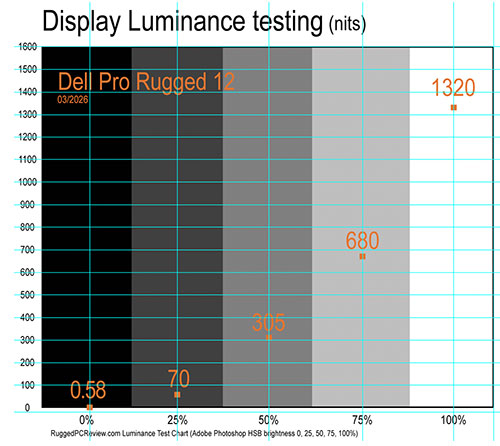
The current 12-inch Pro Rugged 12 continues that trajectory. Dell rates the display at 1,200 nits, and our measurements reached 1,320 nits. That is slightly brighter than the 10-inch Pro Rugged 10, which is rated at 1,000 nits but measured 1,090 nits in our testing.
The photo sequence below shows the Pro Rugged 12 outdoors: first viewed straight on, then angled slightly so the sky reflects across the upper portion of the display, and finally tilted further so the sky reflects across the entire screen.
Note the near absence of harsh reflections in all four images. This is largely due to the tablet's semi-matte display surface, which diffuses incoming light rather than reflecting it sharply.

There is always a tradeoff, however. Reflections never disappear entirely — they are an unavoidable consequence of physics. Semi-matte surfaces scatter reflected light instead of producing mirror-like reflections, which greatly improves outdoor usability. The tradeoff is that diffusing light can make the image appear slightly less vivid than on glossy displays.
Glossy screens often appear more vibrant when displaying colorful images, but they are also far more susceptible to distracting reflections and frequently require repositioning when used outdoors. For many users working in the field, the semi-matte approach remains the more practical and effective solution.
Exemplary tablet control interface
Tablets fail or succeed by not only the ease at which they can be used and controlled, but also by tablet-optimized software, apps and utilities. That's especially important in the Windows world which, despite progress made with Windows 10 and 11, is deeply rooted in decades' worth of the desktop/keyboard/mouse paradigm.
Dell knows that and that's the reason why their tablet has a number of physical control buttons to quickly adjust volume and screen brightness, and perform frequently used tasks with two programmable function keys (three on the 12-inch model). Thank you, Dell!
 While the buttons help augment the tablet experience on the hardware side, Dell's also addressing matters on the software side.
That's where the "Rugged Control Center" app comes in. It includes a dashboard that can be populated with one-touch hardware controls and quick launch shortcuts, and also allows setting of the programmable hardware buttons (each has a short press and a long press function). There are also tabs for GPS status, overall system information, and settings.
Also of note: the Dell Optimizer. It's like getting a checkup for your tablet, without having to resort to third party utilities that may or may not be legit. Support Assist makes sure you have the latest drives and downloads, scans the hardware for problems, cleans files, tunes performance, optimizes the network and detects and eliminates viruses and malware. It then logs a history so users have a record of how the system has been doing. SupportAssist also provides easy ways to contact an agent, submit files, and get online support.
Cameras: much better than most
The Dell Pro Rugged 12 tablet can be ordered with an optional integrated 8MP front-facing webcam, up from 5MP in the predecessor Latitude Rugged Extreme tablet, along with an 11MP rear-facing camera with LED flash.  Both cameras include manual, hand-operated privacy shutters. We used to question the necessity of such shutters, but no longer. They are a simple, low-tech, and very effective way to guard against unauthorized camera access via spyware or malware.
Virtually all smartphones and tablets now include both front and rear cameras, so omitting them from rugged tablets would likely be seen as a drawback by many customers. Integrated cameras are frequently used for documentation, inspection, and reporting tasks — and having a camera paired with a 12-inch display elevates image capture and review well beyond what is possible on a smartphone screen.
Below is a compilation of sample images taken with the Dell Pro Rugged 12's rear camera. Tapping the image collection opens a full-size version in a separate window.

We have never been big fans of the standard Windows Camera app, which remains fairly basic and generic. The version on our review unit was revision 2023.2510.2.0. Image resolution options are limited to two settings: 3840 × 2160 pixels in 16:9 format, and 3648 × 2736 pixels in 4:3 format. That is not a limitation in practice, as the tablet offers ample storage for large numbers of high-resolution images.
 The app allows selection of several framing grids and provides access to contrast, brightness, sharpness, saturation, and privacy settings via the system camera controls. It also supports time-lapse capture and multiple flash modes. Enabling "advanced controls" unlocks manual shutter speed and ISO adjustment, exposure compensation, six white-balance presets, a timer, and digital zoom. Available shooting modes include panorama, video, photo, document, whiteboard, and barcode. The document mode supports focusing as close as four inches, which is useful for capturing sharp close-up details.
For video recording, six resolutions are available, ranging from 480p up to 2160p (effectively 4K), all at 30 frames per second.
The bottom line is that Dell equipped the Pro Rugged 12 with cameras that are quite a bit better than those found on most rugged systems. That matters, because today's users are accustomed to the excellent cameras built into modern smartphones and to the sophisticated imaging apps that accompany them. As implemented here, the Pro Rugged 12's cameras are more than adequate for many documentation and inspection tasks, and they also deliver very good image quality for video conferencing.
Summary: The Dell Pro Rugged 12 Tablet
Compared to Dell's overall sales volume — just under $100 billion for fiscal 2025 — the global market for rugged tablets is relatively small, likely on the order of about a billion dollars per year worldwide, though estimates vary widely. Even so, Dell has been a serious competitor in this specialized segment for years, offering rugged tablets in both the 10-inch and 12-inch classes. The new Pro Rugged 12 further strengthens that position and stands out as one of the most capable rugged tablets currently available.

The Pro Rugged 12 tablet — visually similar to its Latitude 7230 Rugged Extreme predecessor — has a great deal going for it. With a starting weight of under three pounds, it is lighter than much of the competition. In terms of technology and performance, it ranks among the very best in the 12-inch rugged tablet class. The tablet offers excellent connectivity, extensive configuration options, a very well executed detachable keyboard, and a wide range of genuinely useful accessories.
Its semi-matte 12.0-inch 1920 × 1200 display is very bright and provides excellent reflection control, making it easy to use outdoors — even in direct sunlight. The touchscreen supports responsive multi-touch input and works reliably with gloves. The included narrow-tip capacitive stylus performs well for everyday interaction, and an active pen option is available for users who require more precise input.
 The Dell Pro Rugged 12 tablet covers all the connectivity essentials, including USB Type-A, dual Thunderbolt 4 Type-C ports, and a microSD card slot. It can also be configured with optional fingerprint authentication as well as standard or contactless smart card readers. For mobile deployments, a range of Havis vehicle dock solutions adds expanded connectivity, while office users can opt for a convenient desk dock that also supports dual battery charging.
Available with a choice of five Intel Core Ultra Series 2 processors, the Dell Pro Rugged 12 combines excellent computing performance with impressive power efficiency, making extended work shifts possible without frequent battery charging. Contributing to this capability are very fast 8,533 MHz LPDDR5x system memory and high-performance PCIe NVMe solid-state storage.
As its name suggests, the Pro Rugged 12 is designed to withstand demanding field conditions. All ports are protected by sealed doors, the chassis incorporates integrated protective bumpers, and the overall construction feels exceptionally solid. Dell also provides comprehensive ruggedness and durability testing to support those design claims.
Having reviewed rugged tablets for more than three decades, it is fair to say that the Pro Rugged 12 stands out as one of the most refined and well-balanced designs currently available in this class. It combines modern processor technology, strong AI capabilities, excellent display performance, and thoughtful mechanical engineering in a system that remains practical to carry and use in the field.
Add to that Dell's extensive enterprise capabilities, services portfolio, and one-stop-shopping appeal, and this new 12-inch rugged Windows tablet is very likely to become a popular choice across a wide range of enterprise and field deployments.
– Conrad H. Blickenstorfer, March 2026
|
Dell Pro Rugged 12 Tablet Specifications
|
| Added/changed |
Introduced 10/2025, full review 02/2026
|
| Type
|
Rugged tablet
|
| CPU
|
Intel Core Ultra 7 268V, vPro, 8 cores/8 threads, up to 5.00GHz turbo
Intel Core Ultra 7 266V, vPro, 8 cores/8 threads, up to 5.00GHz turbo
Intel Core Ultra 5 238V, vPro, 8 cores/8 threads, up to 4.70GHz turbo
Intel Core Ultra 5 236V, vPro, 8 cores/8 threads, up to 4.70GHz turbo
Intel Core Ultra 5 226V, 8 cores/8 threads, up to 4.50GHz turbo
|
| Thermal Design Power
|
All 17/37 watts
|
| OS
|
Windows 11 Home, Windows 11 Pro
|
| Graphics
|
Intel Arc 140V (268V and 266V)
Intel Arc 130V (238V, 236V and 226V)
|
| Memory
|
Integrated 16GB or 32GB 8533MHz LPDDR5x RAM
|
| Display
|
Outdoor-readable, anti-smudge, anti-glare, LED backlight, protective front glass, 1200 nits (1320 nits as tested)
|
| Display size and resolution
|
12.0-inch/1920 x 1200 pixel, 16:10 aspect ratio, 189 pixels per inch
|
| Digitizer/Pens
|
Capacitive multi-touch, water/glove-capable; optional active pen
|
| Keyboard
|
Onscreen, optional external
|
| Storage
|
M.2 2230 socket, QLC PCIe NVMe Gen4 x4 2 TB or
M.2 2230 socket, TLC PCIe NVMe Gen4 x4 256 GB, 512 GB, 1 TB or
M.2 2230 socket, TLC, SED PCIe NVMe Gen4 x4 256 GB, 512 GB
|
| Internal slots
|
M.2 2230 slot for solid-state drive
M.2 2230 slot for Wi-Fi and Bluetooth card
M.2 3052 slot for WWAN card
1 x microSD card, optional: Nano-SIM card, smart-card
|
| Housing
|
Est: Plastic resin and thermoplastic elastomer (TPE), VESA 50 mounting points
|
| Temperature
|
Normal operating temperature: -30°C to 70°C (-22°F to 158°F)
Extended operating temperature: -40°C to 85°C (-40°F to 185°F)
|
| Humidity
|
10-95% noncondensing
|
| Vehicle vibration
|
Vertical: 1.08 GRMS
Transverse: 0.21 GRMS
Longitudinal: 0.76 GRMS
|
| Salt Fog
|
MIL-STD-810H, Method 509.5, Procedure I (optional)
|
| Enclosure Class
|
IP66
|
| Altitude
|
MIL-STD-810H, Method 500.5, Procedure II (15,000 feet operating)
|
| Shock: Transit Drop
|
MIL-STD-810H transit drop (48")
|
| HazLoc
|
Optional: ANSI/ISA.12.12.01 certification capable (Class I, Division 2, Groups A, B, C, D)
|
| Size (inches)
|
11.85 x 8.19 x 1.17 inches (301 x 208 x 30 mm)
|
| Weight
|
Starting at 2.89 lbs. (1.31 kg)
|
| Power
|
Dual 35.6 Whr Li-Ion replaceable, hot-swappable
|
| Cameras
|
Optional: User-facing 8mb RGB/VGA IR camera and 11mb documentation camera, both with mechanical privacy shutters
|
| Scanning
|
Optional: 1D/2D barcode scanner
|
| Security
|
TPM 2.0 FIPS-140-2 and TCG certified, fingerprint reader, chassis and battery intrusion detection, lock slot; optional: Fingerprint reader, Contacted Smart Card reader, NFC, and Control Vault 3
|
| Sensors
|
Ambient light (ALS), eCompass/magnetometer, proximity, hall effect, screen rotation support, gyro + accelerometer |
| Communication
|
Intel Wi-Fi 7 BE201 + Bluetooth 5.4; Qualcomm Snapdragon X72 Global 5G Mode, (DW5934e), eSIM/SIM Dell Global 5G (DW5931E), eSIM/SIM
|
| GPS
|
GPS: Airoha GNSS, L1 (1575.42 MHz)
|
| Interface
|
2 x Thunderbolt 4 Type-C ports with DisplayPort Alt mode/USB4/Power Delivery
1 x USB 3.2 Gen 1 Type-A with PowerShare
Optional I/O bay: USB-A OR RJ-45 OR updated scanner or global headset jack
|
| Price
|
As of mid-February 2026, per Dell website the Dell Pro Rugged 12 Tablet starts at $3,561 (volume discounts available)
|
| Website
|
Dell Pro Rugged 12 Tablet
|
| Spec sheet
|
 Dell Pro Rugged 12 Tablet spec sheet Dell Pro Rugged 12 Tablet spec sheet
|
| Warranty
|
Standard 3-year mail-in service after remote diagnosis. Optional 3-5 year support, accidental damage, next-business-day
|